BCBS Federal Employee Program, Public Website
Helping members navigate complex Medicare decisions
A three-page Medicare hub, a personalized enrollment timeline, and research-validated content for a federal employee health plan’s public website.

Role
Lead UX Designer (sole UX practitioner)
Team
Copy editor
Visual designer
2 developers
Project manager
Content management associate
Third-party user research team
Timeline
About 8 months
Discovery and research: ~2 months
Design and prototyping: ~4 months
User testing and iteration: ~2 months
Tools
Figma, Jira, Miro, Sitecore CMS
Platform
Responsive website
Overview
Project at a glance
TL;DR

Client background
The Blue Cross and Blue Shield Service Benefit Plan, also known as the Federal Employee Program (FEP), provides health insurance coverage to current and retired federal employees. As lead UX designer at MERGE, I supported FEP’s public website for about two years, owning all projects across the engagement.
Goal
Transform FEP’s sparse Medicare content into an accessible hub that helps members understand enrollment, evaluate how Medicare works with their FEP coverage, and find answers wherever they are in the decision, without overwhelming them during an already stressful transition.
Discovery
Research and guiding principles
Discovery and background research
The client brief listed topics to include, but we first needed to understand Medicare itself and the questions members face as they approach eligibility.
I conducted a competitive analysis of FEP’s direct competitors, GEHA and Aetna Feds, along with a comparative review of major carriers including Cigna, Oscar, UnitedHealthcare, and Humana. This helped identify common Medicare content patterns, terminology, decision points, and information gaps. For the Medicare information itself, we relied on Medicare.gov and SSA.gov as the authoritative sources. I then worked with the content and business teams to translate the findings into a clearer content strategy.
Defining guiding principles
To turn the research into clear direction for the hub, we defined three guiding principles. They helped the team and client stakeholders decide what content to include, how much detail to show, and how to frame FEP’s role throughout the Medicare transition.
Reduce information overload
Many members approaching Medicare eligibility knew little about the program and felt overwhelmed by the volume and complexity of available information. They needed clear, consistent guidance that helped them make decisions without adding stress.
Explain choices and tradeoffs
Many members knew they could keep FEP after retirement but didn’t understand how it worked with Medicare. They needed clear explanations of Part B enrollment, penalties, and what changing their coverage would mean.
Build trust during the transition
Members face a flood of competing Medicare options and marketing messages. FEP wanted to be the reliable source members turned to first, and to help them understand the value of keeping FEP coverage alongside Medicare.
Design
Information architecture and design
Creating the Medicare hub
Our research showed that the Medicare journey is rarely linear. Some members start by researching enrollment dates, while others start with coverage, cost, or retirement questions. The architecture needed to support multiple entry points and let members move between related topics based on their immediate needs.
We organized the experience into three pages, each answering a distinct group of questions so members could explore without following a rigid, linear sequence:
02
Combining FEP and Medicare
Explained how Medicare and FEP coverage could work together, and helped members understand the benefits and tradeoffs of different coverage decisions.
Personalized enrollment timeline
Medicare’s Initial Enrollment Period spans seven months:
Three months before a person’s 65th birthday
Their birthday month
Three months after their birthday
Rather than asking members to work out this window themselves, we designed a personalized enrollment timeline. After entering their birth date, members saw a visual timeline of their individual enrollment window. Members who had already passed the standard enrollment period were directed to information specifically for people 65 and older.
Although the interaction appeared simple, it required close collaboration between UX, visual design, front-end development, and back-end development to define the date logic, content states, and edge cases.
Personalized enrollment timeline showing a member’s seven-month enrollment window
Testing
Prototype testing
Building the prototype
After several rounds of internal and client review, I created a high-fidelity Figma prototype that included:
The three Medicare pages
Related Medicare content throughout the website
Homepage entry points
The personalized enrollment timeline
Primary navigation and dropdown menus
Charts, infographics, and interactive content
Including the broader navigation let us test not only the Medicare content, but also whether members could find it from different places across the website.
I presented the prototype to the client and the third-party research team, walking them through our hypotheses, key questions, and priority tasks.
Prototype walkthrough of the three Medicare hub pages
DESKTOP Pages
Preparing for Medicare
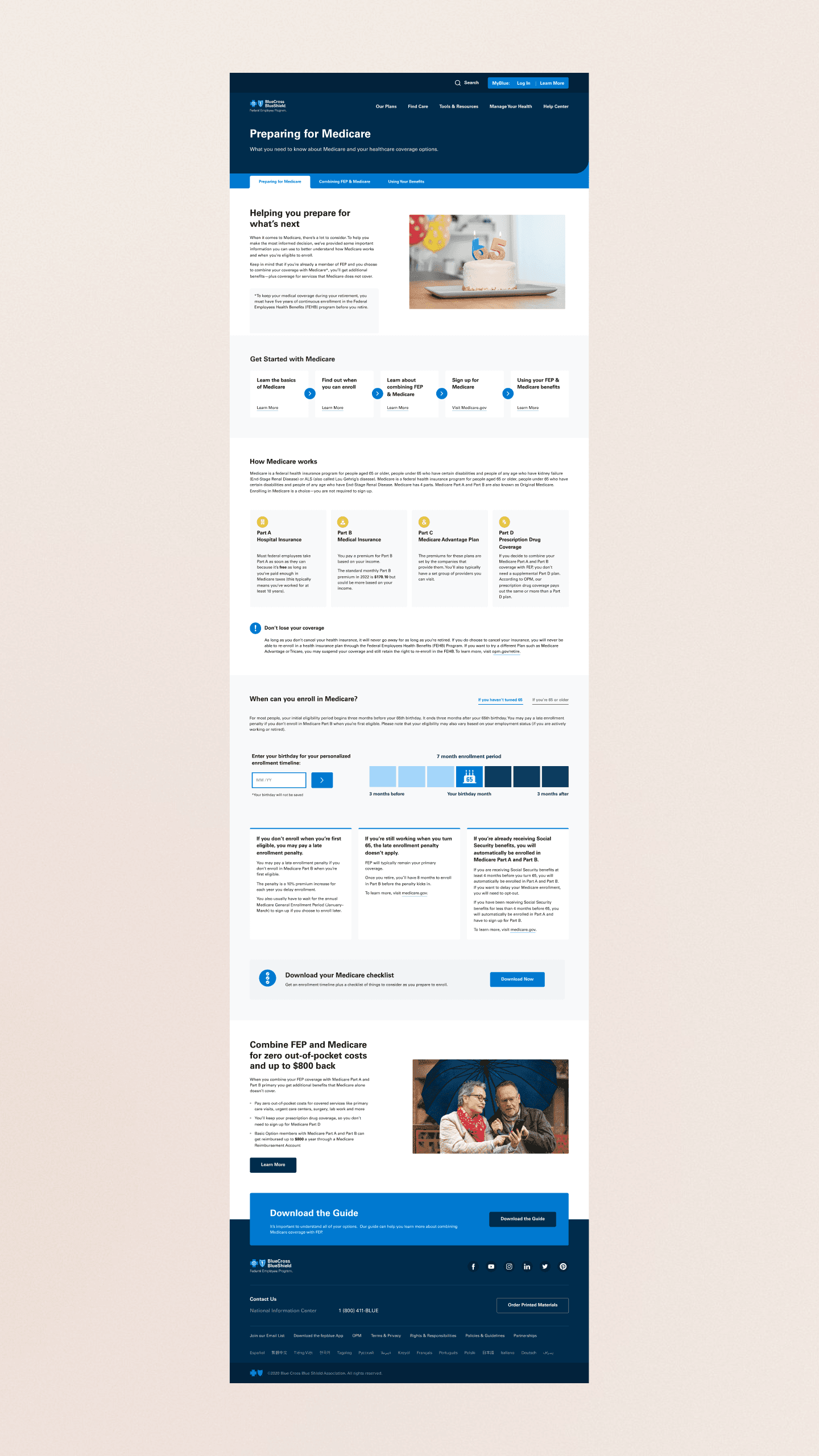
Combining FEP and Medicare

Using Your Benefits

Research planning
A third-party research team recruited participants, moderated sessions, and presented the findings. I partnered with them on study design and observed sessions throughout the study.
I helped develop the moderator guide and testing scripts, reviewing the questions to reduce leading language so participants could share their reactions without being steered toward a preferred response. During the interviews, I shared follow-up questions and emerging themes with the moderators.
By the numbers
60%
of participants were between 60 and 64 years old
Key objectives
01
Support retention
Did the content help members understand the value of keeping FEP coverage alongside Medicare?
02
Support informed decisions
Did members get enough clear, relevant information to evaluate their options?
03
Establish FEP as a trusted partner
Did the experience make FEP feel like a helpful guide through the Medicare transition?
04
Validate comprehension
Were the charts, timelines, illustrations, and supporting content easy to understand?
Key research insight
The research revealed a significant knowledge gap between participants.
Some participants were already highly familiar with Medicare and needed only targeted information. Others knew very little and wanted the FEP website to be their primary educational resource. Participants who were less familiar with Medicare especially appreciated the easy-to-understand language, the timeline, and the navigation placement.
This reinforced the need for a flexible, layered content strategy. Pages needed to be scannable for knowledgeable members while offering enough explanation and supporting detail for members just beginning their research.
Testing largely validated the overall page structure and design direction, giving the client confidence to move forward. Participants also pointed to a few clear gaps:
Costs
Wanted a direct path to information about Medicare costs.
Parts of Medicare
Wanted more detail on what each part of Medicare covers.
Spouses
Wanted information on what to do if their spouse is still working.
Delivery
Iteration and delivery
Iterate
After the research readout, I translated the findings into design and content recommendations for each page, then worked with the copy editor, visual designer, and client stakeholders to put them in place:
Added a link to Medicare cost information so members could find it without searching.
Expanded the explanations of the different parts of Medicare for members who were new to the program.
Replaced the Social Security information with guidance for members whose spouse is still working.
Across all three pages, we also refined the hierarchy and simplified complex explanations so the content stayed scannable as it grew.

CMS implementation
I partnered with the project manager and content management associate to build the final pages in Sitecore.
Once the content was implemented, I ran design-quality reviews in the staging environment to confirm that:
Layouts matched the approved Figma designs
Responsive states worked across screen sizes
Accessibility and usability requirements were maintained
Components behaved as intended
Content hierarchy stayed clear
After final client review, the Medicare hub was published and promoted throughout the FEP public website.
View the live FEP Medicare hub (the site may have changed since launch).
Outcomes
Outcomes and reflection
Outcomes
A comprehensive Medicare hub that replaced FEP’s sparse content and now supports members at every stage of research and decision-making.
A personalized enrollment timeline that turns complex eligibility rules into individual guidance.
A launch within FEP’s existing Sitecore CMS and component library, with design intent and responsive behavior preserved through implementation.
Client confidence to move forward, backed by 20 moderated interviews that validated the structure and design direction.
A scalable foundation for future Medicare education and member-support content.
Reflection
This project reinforced that simplifying complex information doesn’t always mean showing less of it. For members new to Medicare, too little detail created more uncertainty, so a layered approach let the hub feel approachable without withholding what members needed to decide.


